
Intro
C offers straightforward, simple and complete control over what the developer wants to do, it only requires that developer state their intentions explicitly.
The blog will updated as I learn something new about C. There will be no links directing to another post. Everything will be documented about C here. I will try to keep it as informative and concise as possible.
Letss GOO!!!
Topics:
- C code structure.
- Data types, Operators and Expressions.
- Control flow.
- Dynamic Memory Management.
- Functions and Pointers.
- Arrays and Pointers.
- Structures and Pointers.
- Compilation process and everything.
- Working of C on hardware.
- Extras (the OG information).
- References.
1. C code structure
Refer comments to understand the structure.
// 1. Preprocessor Directives (Include files, macros)
#include <stdio.h> // Includes the standard input/output library for functions like printf, scanf

// Optional: Global variable declarations
// int globalVariable = 10;

// Optional: Function Prototypes (Declarations)
// Tells the compiler about functions defined later in the file or in other files.
void greetUser(char* name);
int add(int a, int b);

// 2. The main() function
// The entry point of every C program. Execution begins here.
int main() {
    // 3. Local variable declarations within main()
    char userName[] = "Alice";
    int num1 = 5;
    int num2 = 3;
    int sum;

    // 4. Statements (Instructions to the computer)
    printf("Hello, world!\n"); // Call to a standard library function

    greetUser(userName); // Call to a user-defined function

    sum = add(num1, num2); // Call to another user-defined function
    printf("The sum of %d and %d is: %d\n", num1, num2, sum);

    // 5. Return Statement
    // Indicates the program's exit status to the operating system.
    // 0 typically means successful execution.
    return 0;
}

// 6. Function Definitions (User-defined functions)
// The actual implementation of the functions declared above.
void greetUser(char* name) {
    printf("Hello, %s!\n", name);
}

int add(int a, int b) {
    return a + b;
}
2. Data types, operators & expressions
Variables and constants: Data objects manipulated in a program. Operators specify what is to be done with them. Expressions combine variables and constants to produce new values. The type of object determines the set of values it can have and what operations it can perform.
Variables:
- Names are made of letter and digits; the first character must be a letter. the “_” counts as a letter
- We do not start with “_”, but library routines do.
- Keywords (if, else if, switch, etc.) are reserved and can’t be used.
- Choose variable names that are related to the purpose of the variable.*
- We have a number of qualifiers which can be applied to the data types in the following table. That includes: short, long, signed, unisgned. The standard headers <limits.h> and <float.h> contain symbolic constants for all thes sizes.
| Data Type | Description |
| char | 1byte, holds one character/letter/number |
| int | reflecting the natural size of integers on the host machine |
| float | Single precision floating point |
| double | double precision floating point |
Constants:
- An integer constant looks like 0532. A long constant is written with an L, as 123456789L. An unsigned long is constant ends with UL.
- A leading 0 on an integer constant means octal, a leading 0x means hexadecimal. These can also have qualifiers like long or unsigned long.
- ‘x’ is not same “x”: the former is an integer used to produce numeric value of the letter x in machines character set. the latter is an array of characters that contains one character x and a ‘\0’.
- The character constant ‘\0’ represents a value of zero(null character). It is done so to emphasize character nature of some expression.
- The physical storage of a string needs one more than the number of character written between the quotes due to ‘\0’ at the end.
- Enumeration constant: It is a list of constant integer values. The first name in an enum has value 0 and next and so on, unless explicit values are specified like in enum months example below. Enums are an alternatives to #define with the advantage that the values are generated for me. Enumeration offers the chance of checking an so are often better than #define. Further, a debugger may be able to print values of enumeration variables in their symbolic forms.
enum boolean {NO, YES};

enum months {JAN = 1, FEB, MARCH, APRIL, MAP, JUNE, JULY, AUG, SEPT, OCT, NOV, DEC};Declarations:
- All variables must be declared before use, although certain declarations can be made implicit by context. A declarations specifies type.
- If the variable is not automatic, the initialization is done once only before the program starts executing, and the initializer must be a constant expression.
- An explicitly initialized variable is initialized each time the function or block it is in is entered.
- External and static variables are initialized to zero by default. Automatic variables for which there is no explicit initializer have undefined values.
int LoopStart, LoopEnd;
char c String[100];

const double pi = 3.14159;
const char msg[] = "error: ";
Escape Sequences:
| \a | alert(bell) operator |
| \b | backspace |
| \f | formfeed |
| \n | newline |
| \r | carriage tab |
| \t | horizontal tab |
| \v | vertical tab |
| \\ | backslash |
| \? | question mark |
| \’ | single quote |
| \” | single quote |
| \000 | octal number |
| \xhh | hexadecimal number |
Operators:
The following table summarizes the rules of precedence(decreases as we go down the row) and associativity of all operators. operators in same line have the same precedence.
| Operators | Associativity |
| () [] -> . | left to right |
| ! ~ ++ — + – * & (type) sizeof | right to left |
| * / % | left to right |
| + – | left to right |
| << >> | left to right |
| < <= > >= | left to right |
| == != | left to right |
| & | left to right |
| ^ | left to right |
| | | left to right |
| && | left to right |
| || | left to right |
| ?: | right to left |
| = += -= *= /= %= &= ^= |= <<= >>= | right to left |
| , | left to right |
C does not specify the order in which the operands of an operator are evaluated. Example:
x = f() + g();
f() may be evaluated before g() or vice versa. Thus if the f() or g() have variables depend on each other then x can depend on the order of evaluation.- We observe “side-effects” as a by product of the evaluation of an expression, this happens due subtle dependencies on the order in which variables taking part in the expressions are updated. This is one of the place where understanding hardware plays a role.
- The % operator cannot be applied to float or double.
- The direction of truncation for / and the sign of the result for % are machine dependent for negative operands, as is the action taken on overflow and underflow.
- n++ or n– : value is incremented or decremented after assigning the value. ++n or –n: value is assigned after incrementing or decrementing.
- Bitwise Operation:
- There is no logical or arithmetic shifting for left shift (<<). Zeros are filled in from the rightmost (least significant) end. This is equivalent to multiplication by 2k.
- Right shift(>>) for unsigned int(logical shift) behaves similar to left shift. This is equivalent to division by 2k (logical). But for signed int(arithmetic shift), The sign bit (the most significant bit) is replicated (copied) from the leftmost (most significant) end. This ensures that the sign of the number is preserved. With negative integers when a negative number is perfectly divisible by 2k, the arithmetic right shift is same similar to logical shift.
- C’s truncation-towards-zero rule for integer division when dividing by powers of two.*
| Operator | Operation |
| & (Testing) | To check the state of the bits of given data. |
| | (Setting) | Setting required bits of the given data. |
| &~ (Clearing) | Clearing required bits of the given data. |
| ^ (Toggling) | Toggling required bits of the given data |
| << / >> (Shifting) | For direct register manipulation |
Type Conversions:
- Operator has operands of different types, they are converted to a common type according to a “small number of rules“.
- Small number of rules:
- Integer Promotion:Any integer type smaller than
int(likechar,short,enumtypes, and bit-fields) is automatically converted (promoted) tointorunsigned intbefore most arithmetic operations. - Usual Arithmetic Conversions (UAC):
- Convert the operands to a common type before performing the operation.
- C has a rank system for data types:
Bool < char < short < int < long < long longfloat < double < long double(floating-point types always rank higher than integer types) - If there are two operands of different types then the “lower” type is promoted to “higher” type before the operation proceeds. Always make sure either operand is of same type.
- Assignment Conversions:
- When assigning a value of one type to a variable of another type, the value is converted to the type of the variable being assigned to.
- Implicit narrowing: This can lead to data loss (e.g., assigning a
floatto aninttruncates the decimal part, assigning alongto anintcan overflow). C allows this without a compile-time error, often issuing a warning.
- Function Call Conversions (Default Argument Promotions): When passing arguments to a function without a prototype, integer promotions are applied, and
floatarguments are promoted todouble. This ensures consistency and simplifies argument handling for the called function. - Return Value Conversions: value returned by a function is converted to the function’s declared return type
- Integer Promotion:Any integer type smaller than
- C guarantees that any character in the machine’s standard printing character set will never be negative, so these characters will always be positive in expression. But arbitrary bit patters stored mat appear to be negative on some machines.
- Explicit type conversions is done by unary operator called cast.
(type-name) expression;3. Control Flow
The following are different types of control-flow methods:
if-else & else-if
else can be omitted if not needed. It is used in case an impossible condition comes up or for error detection.
if (expr0)
   -------
else
   .......

(OR)

if (expr0)
   -------
else if (expr1)
   .......
else if (expr2)
   +++++++
else
   =======
Switch
A break statement causes an immediate exit from switch, because cases serve just as labels, after the code for one case is done, execution falls through to the next unless you take explicit action to escape. Even return is used, rarely.
switch (expression) {
  case const-expr: ....
  case const-expr: ----
       break;
  default: ++++
}
Loops–While
while (cond0) {
  ......
  ......
  /* runs the code block until condition fails */
  ......
  ......
}
Loops–For
expr1 and expr3 are assignments or function calls and expr2 is a relational expression.
Operator ‘,‘(comma) is often used in for loops, when a pair of expressions are separated by a comma is evaluated left to right.
for (expr1; expr2; expr3) {
  ......
  ......
  /* runs the code block until expr2 fails */
  ......
  ......
}
Loops–Do-while
do {
  ......
  ......
  /* runs the code block first at least once */
  ......
  ......
} while (cond0);
Break & Continue
while(cond0) {
  //checks if the element of cond0 is present
  if(NotPresent) {
     // check for next element
     continue;
  }
  // if element is present

  ......
  ......
  /* continues with processing the elements */
  ......
  ......

  // if processing fails for element then exit the loop
  if(Error) {
    break;
  }
}
Goto
//label1
starting:
  Starting the loops;

while(cond0) {
  while(cond1) {
    if(error) {
       goto error;
    }
  }
  if(Redo) {
    goto starting;
  }
}

//label2
error:
   print and exit;
4. Dynamic Memory Management
Memory management is crucial for all programs. Sometimes memory is managed during runtime such for automatic variables, while static and global variables are residing in different segment of code(discussed in topic-8). The ability to allocate and deallocate allows the memory to be managed more efficiently and flexibly. “Heap” is that memory which is used to play around.
Steps used for dynamic memory allocation in C are:
- Allocate memory.
- Use the allocated memory to support the application.
- Free the allocated memory.
| Function | Description |
| malloc | allocated memory in heap |
| realloc | reallocates memory based on previous memory |
| calloc | allocates and zeros out memory from the heap |
| free | returns a block of memory to the heap |
Dynamic memory is allocated from the heap, with successive allocation calls, there is not guarantee regarding the order of the memory, but, the memory allocated will be aligned according ti the pointers data type.
The heaps size may be fixed when program is created, or it may be allowed to grow. When free() is called, the deallocated memory is available for subsequent use by the application. It is a good habit to free the memory after it is no longer needed.
Dangling Pointers: A pointer referencing to the original memory after it is being freed. It creates various problems, like:
- Unpredictable behavior of memory accessed.
- Segmentation faults.
- Security risks.
5. Functions & Pointers
Function allows modularity, enable developers to build on what others have done instead of starting over from scratch and break a task into small tasks. The small functions are easier to deal with than big one and irrelevant details can be buried in the functions.
A program is just a set of definitions of variables and functions. Communication between the functions is by arguments and values returned by the functions and through external variables. The function can occur in any order in the source file, and the source program can be split into multiple files.
Always declare the function prototype. If there is no function prototype, a function is implicitly declared by its first appearance in a expression. If a name has not been previously declared occurs in an expression and is followed by a left parenthesis, it is declared by context to be a function name, the function is assumed to return an int, and nothing is assumed about its arguments.
#include <stdio.h> // For printf

// 2. Function Prototype (usually placed at the top of the file or in a header file)
double calculateRectangleArea(double length, double width);

int main() {
    double rectLength = 10.5;
    double rectWidth = 5.0;
    double areaResult;

    printf("Welcome to the Area Calculator!\n");

    // 3. Function Call
    // The values of rectLength and rectWidth are passed as arguments
    // The return value from the function is stored in areaResult
    areaResult = calculateRectangleArea(rectLength, rectWidth);

    printf("A rectangle with length %.2f and width %.2f has an area of %.2f\n",
           rectLength, rectWidth, areaResult);

    // Another function call with different values
    printf("Area of a 7.0x3.5 rectangle: %.2f\n", calculateRectangleArea(7.0, 3.5));

    return 0;
}

// 1. Function Definition (can be before or after main, as long as prototyped)
double calculateRectangleArea(double length, double width) {
    double area = length * width;
    return area;
}
A declaration announces the properties of a variable, a definition also causes storage to be set aside and also serve as the declaration for the rest of source files. There must be only one definition of an external variable among all the files that make up the source program.
Always place common material in a common header
// file1.c
extern sp;
extern double val[];

// file2.c
int sp = 0;
double val[MAX];
External variables: they offer greater scope and lifetime. Automatic variables are internal to a function; they come into existence where the function is entered, and disappear when it is left. External variables, on the other hand, are permanent, so they retain values from one function invocation to the next.
Static variables: applied to an external variable or function limits the scope of that object to the rest of the source file being compiled. If the same variable name is used in different files, no conflict will be observed. Static is used for function too, then, it is invisible outside of the file in which it is declared. The static declaration can be internal, such variables are local to a particular function just as automatic variables are, but they remain in existence rather than coming and going each time the function is activated.
static int buf = 0;Register variables: this advises the compiler that the variable will be used heavily, the variables are to be placed in machine registers, which may result in smaller and faster programs but compilers are free to ignore this advice. The register declaration can only be applied to automatic variables
register int x;Block Structure: The variables can be defined in a block structured fashion within a function. Variables declared in this way hide any identically named variables in outer blocks, and remain in existence until the matching right brace.
for (n>0) {
   int i; // declare a new i
   while(i<n--) .....
}Initialization: In the absence of explicit initialization, external and static variables are guaranteed to be initialized to zero, automatic and register variables have undefined initial value. For automatic and register variables, it is done each time the function or block is entered.
File Inclusion:
#include "filename"

or

#include <filename>
The above are replaced by the contents of the file name. If the file name is quoted, searching for the file typically begins where the source program was found; if it is not found there, or if the name is enclosed in “< >”, searching follows an implementation-defined rule to find the file. #include is the preferred way to tie the declarations together for a large program.
Macro Substitution:
#define name replacement_text

Ex:
#define forever for (;;) // infinite loop
Names can be undefined with #undef, usually to ensure that a routine is really a function, not a macro. Formal parameters are not replaced with quoted strings. If parameter name is preceded by a # in replacement text, the combination will be expanded into a quoted string.
#define dprint(expr) printf(#expr " = %d\n", expr)The pre-processor ## provides a way to concatenate actual arguments during macro expansion.
#define paste(front, back) front ## backConditional Inclusion: It is used to control pre-processing with conditional statements. #if evaluates a constant integer expression, if the expression is non-zero, subsequent lines until #endif, #elif, #else are included. The expression #defined in a #if is 1 if the name has been defined. The #ifdef and #ifndef lines are specialized forms that test whether a name is defined.
#if !defined (ProjA)
#define ProjA

// contents of ProjA are here

#endif
Function Pointers: A function itself is not a variable, but it is possible to define pointers to functions, which can be assigned, placed in arrays, passed to functions, returned by functions, and so on. Functions themselves have addresses in memory, just like variables. A “pointer to a function” is a variable that stores the memory address of a function. This allows you to call a function indirectly through the pointer, pass functions as arguments to other functions, store functions in data structures, and even return functions from other functions.
Syntax:
return_type (*pointer_name)(parameter_type1, parameter_type2, ...);
#include <stdio.h>

int add(int a, int b) {
    return a + b;
}

int main() {
    int (*ptr_to_add)(int, int);
    // The address operator is not necessary. The compiler will ignore even if used.
    ptr_to_add = add;

    int result = ptr_to_add(20, 7); // Implicit dereferencing (more common)
    printf("Result : %d\n", result); // Output: Result : 27

    return 0;
}
Advantage of function pointers:
- Callbacks: Implementing event handling.
- Generic Programming: Writing more flexible and reusable code
- State Machines: Defining transitions in state machines where each state might trigger a different function.
- Jump Tables: Creating arrays of function pointers to implement efficient dispatch mechanisms, often used in parsing commands or interpreting byte codes.
Example:

#include <stdio.h>

int addition (int a, int b) {
    return a + b;
}

int multiply (int a, int b) {
    return a * b;
}

int division (int a, int b) {
    if (b == 0) {
        printf("Error: Division by zero!\n");
        return 0; // Or handle error
    }
    return a / b;
}

int main() {
    // Each pointer points to a function that takes two ints and returns an int.
    int (*funcArr[])(int, int) = {addition, multiply, division};

    // Calculate the number of elements in the array
    int num_functions = sizeof(funcArr) / sizeof(funcArr[0]);

    for (int i = 0; i < num_functions; i++) {
        printf("Result of operation %d = %d\n", i + 1, funcArr[i](10, 5));
    }

    return 0;
}
Disadvantage of function pointers: It will slower the running program, as the processor may not able to use branch prediction with pipelining. Pipelining is hardware technology used to improve processor performance. The use of function pointers in table lookups mitigate performance issue.
Returning pointer of a local data: Consider the following example. The address of the local_variable returned is not valid once the function returns because the functions stack frame is popped off the stack, while the location may still have contain 100, but will will be overridden if another functions is called.
// DANGER: This function returns a pointer to a local variable.
// The memory pointed to will be invalid after the function returns.
int* create_and_return_local_pointer_DANGEROUS () {
    int local_variable = 100; // This is a local variable, stored on the stack.
    printf("Inside function: local_variable address = %p, value = %d\n",
           (void*)&local_variable, local_variable);

    return &local_variable; // Returning the address of a stack-allocated variable
}

int main () {
    printf("--- Demonstrating the DANGER of returning a pointer to a local variable ---\n\n");

    int *ptr = create_and_return_local_pointer_DANGEROUS (); // ptr now holds a dangling pointer


    return 0;
}
6. Arrays & Pointers
A pointer is a variable that contains the address of a variable. They lead to more compact and efficient code than can be obtained in other ways.
- “&” gives the address of an object.
- “*” indirection or dereferencing operator, it access the object the pointer points to.
Example:
int x = 1;
int y = 2;
int z[10];

int *ip;     /* ip is a pointer of type int */
ip = &x;     /* ip now points to x */
y = *ip;     /* y holds 1 */
*ip = 0;     /* x is now 0 */
ip = &z[0];  /* ip now points to z[0] */
Example to understand pointer arithmetic:
int Arr[] = {20, 30, 40};
int *ptr = Arr;
int q = 0;| Pointer operation | Arr[0] | Arr[1] | *ptr | q | Description |
| q = *ptr; | 20 | 30 | 20 | 20 | Remains same. |
| q = ++*ptr; | 21 | 30 | 21 | 21 | Increments the value in addr. |
| q = ++(*ptr); | 21 | 30 | 21 | 21 | Increments value in addr. |
| q = *ptr++; | 20 | 30 | 30 | 20 | Increments addr. in pointer |
| q = (*ptr)++; | 21 | 30 | 21 | 20 | Increments value in addr. |
| q = *(ptr++); | 20 | 30 | 30 | 20 | Increments addr. in pointer |
| q = *(++ptr); | 20 | 30 | 30 | 30 | Increments addr. in pointer |
| q = *++ptr; | 20 | 30 | 30 | 30 | Increments addr. in pointer |
Pass by reference:it is a mechanism for passing arguments to a function where the function receives a reference (or memory address) to the actual argument in the caller’s scope, rather than a copy of its value. This allows the function to directly modify the original variable in the calling code. When you pass the address of a variable (using the & address-of operator) to a function, and the function receives that address as a pointer, it can then use the pointer to de-reference (access the value at that memory location) and modify the original variable.
#include <stdio.h>

// Function that takes pointers to integers
// 'a_ptr' and 'b_ptr' will hold the memory addresses of the original variables
void swap(int *a_ptr, int *b_ptr) {
    int temp = *a_ptr; // Dereference a_ptr to get the value it points to
    *a_ptr = *b_ptr;   // Dereference a_ptr and assign the value pointed to by b_ptr
    *b_ptr = temp;     // Dereference b_ptr and assign the value of temp

    printf("Inside swap function: *a_ptr = %d, *b_ptr = %d\n", *a_ptr, *b_ptr);
}

int main() {
    int x = 10;
    int y = 20;

    printf("Before swap: x = %d, y = %d\n", x, y);

    // Pass the addresses of x and y to the swap function
    swap(&x, &y); // &x gives the address of x, &y gives the address of y

    printf("After swap: x = %d, y = %d\n", x, y); // x and y are now swapped!

    return 0;
}
Output:
Before swap: x = 10, y = 20
Inside swap function: *a_ptr = 20, *b_ptr = 10
After swap: x = 20, y = 10
In C there is relationship between pointers and arrays i.e., any operation that can be achieved by array sub-scripting can also be done with pointers. The pointer version will be fast.
In evaluating a[i] of an array a[10], C converts it to *(a+i) immediately, the two forms are equivalent. Further, consider a pointer *pa=&a[0]; if pa is a pointer, expressions may use it with subscript; pa[i] is identical to *(pa+i). A pointer is a variable, so pa=a and pa++ are legal. But an array name is not a variable; constructions like a=pa and a++ are illegal.
Pointers and integers are not interchangeable. Zero is an exception: the constant zero may be assigned to a pointer, and a pointer ma be compared with constant zero. The symbolic constant NULL as a mnemonic for 0 that this is a special value for a pointer.
Pointers to pointers: A pointer that points to another pointer. This is the most direct interpretation of “multi-dimensional pointer” when you go beyond two dimensions.
Syntax: type **pointer_to_pointer_name;

This means pointer_to_pointer_name holds the address of another pointer, which in turn holds the address of a type variable.
#include <stdio.h>

int main() {
    int x = 100;
    int *ptr_to_x = &x;       // ptr_to_x points to x
    int **ptr_to_ptr_to_x = &ptr_to_x; // ptr_to_ptr_to_x points to ptr_to_x

    printf("Value of x: %d\n", x); // Output: 100
    printf("Value pointed to by ptr_to_x: %d\n", *ptr_to_x); // Output: 100
    printf("Value pointed to by ptr_to_ptr_to_x: %d\n", **ptr_to_ptr_to_x); // Output: 100

    // You can modify x through the double pointer
    **ptr_to_ptr_to_x = 200;
    printf("New value of x: %d\n", x); // Output: 200

    return 0;
}
Passing a Pointer to a Pointer: It’s an extension of “call by reference”. When a pointer is passed to a function, it is passed by value. If we want to modify the original pointer and not the copy of the pointer, we need to pass it as a pointer to a pointer.
The following example explains why passing a single pointer will fail:
#include <stdio.h>
#include <stdlib.h>

void allocate_and_fail(int *ptr) {
    // This pointer 'ptr' is a local copy of my_ptr's address from main.
    // The memory is allocated, and 'ptr' points to it.
    ptr = (int*)malloc(sizeof(int));
    if (ptr == NULL) return;
    *ptr = 100;

    // When this function ends, the local copy 'ptr' is destroyed.
    // 'my_ptr' in main is still NULL. The allocated memory is now leaked.
}

int main() {
    int *my_ptr = NULL; // Initially, it points to nothing.

    allocate_and_fail(my_ptr); // Passing by value (a copy of the NULL address).

    if (my_ptr == NULL) {
        printf("my_ptr is still NULL. Allocation failed.\n");
    }

    return 0;
}
In this case, allocate_and_fail receives a copy of the NULL value. It successfully allocates memory, but it only changes its local copy of the pointer. The original my_ptr in main remains unchanged.
Now, when we re-write the above code using pointer to pointer:
To change my_ptr itself, you must pass its address. Since my_ptr is already a pointer (int*), its address is a pointer to an int*, which is an int**.
here#include <stdlib.h>

// The function now takes a pointer to a pointer to an integer (int**).
void allocate_and_succeed(int **ptr_to_ptr) {
    // We are at level 2 of indirection.
    // *ptr_to_ptr dereferences to the pointer variable from main.
    // We can now assign a new address to it.
    *ptr_to_ptr = (int*)malloc(sizeof(int));

    if (*ptr_to_ptr == NULL) return;

    // Now, let's dereference one more time to access the memory itself.
    // **ptr_to_ptr is equivalent to *my_ptr in main.
    **ptr_to_ptr = 100;
}

int main() {
    int *my_ptr = NULL;

    // Pass the address of my_ptr (which is of type int*)
    allocate_and_succeed(&my_ptr);

    if (my_ptr != NULL) {
        printf("my_ptr is no longer NULL! It points to %d\n", *my_ptr);
        // Clean up the dynamically allocated memory
        free(my_ptr);
        my_ptr = NULL;
    } else {
        printf("Memory allocation failed.\n");
    }

    return 0;
}
Array of Pointers: An array where each element is itself a pointer. This can then be used to create “jagged” arrays or manage dynamically allocated memory. An array of pointers is simply an array where each element holds an address (a pointer) to something else. This “something else” could be a single variable, or the beginning of another array.
Syntax: type *array_name[size];

type *: Each element in the array is a pointer to type.
array_name[size]: array_name is an array of size elements.
For strings:
#include <stdio.h>

int main() {
    // This creates an array where each element is a pointer to the first character of a string literal.
    const char *names[] = {
        "Alice",
        "Bob",
        "Charlie",
        "David"
    };

    printf("First name: %s\n", names[0]);    // Output: Alice
    printf("Third name: %s\n", names[2]);    // Output: Charlie

    // You can iterate through it
    for (int i = 0; i < 4; i++) {
        printf("Name %d: %s\n", i + 1, names[i]);
    }

    return 0;
}
For jagged array:
#include <stdio.h>
#include <stdlib.h> // For malloc and free

int main() {
    int rows = 3;
    // An array of pointers to integers. Each pointer will point to a dynamically allocated row.
    int **jagged_array;

    // Allocate memory for 'rows' number of integer pointers
    jagged_array = (int **) malloc(rows * sizeof(int *));
    if (jagged_array == NULL) {
        perror("malloc for rows failed");
        return 1;
    }

    // Allocate memory for each row with different lengths
    int row_lengths[] = {3, 5, 2};

    for (int i = 0; i < rows; i++) {
        jagged_array[i] = (int *) malloc(row_lengths[i] * sizeof(int));
        if (jagged_array[i] == NULL) {
            perror("malloc for row failed");
            // Free previously allocated rows before exiting
            for (int j = 0; j < i; j++) {
                free(jagged_array[j]);
            }
            free(jagged_array);
            return 1;
        }
        // Initialize values
        for (int j = 0; j < row_lengths[i]; j++) {
            jagged_array[i][j] = (i + 1) * 10 + j;
        }
    }

    // Print the jagged array
    printf("Jagged Array:\n");
    for (int i = 0; i < rows; i++) {
        for (int j = 0; j < row_lengths[i]; j++) {
            printf("%d ", jagged_array[i][j]);
        }
        printf("\n");
    }

    // Free the allocated memory (important to prevent memory leaks)
    for (int i = 0; i < rows; i++) {
        free(jagged_array[i]); // Free each row
    }
    free(jagged_array); // Free the array of pointers itself

    return 0;
}
Pointer to Multi-dimensional arrays: A single pointer that points to an entire multi-dimensional array. When you have a true multi-dimensional array in C, like int arr[3][4];, this array is stored contiguously in memory in row-major order. A pointer can be made to point to this entire structure or its rows.
//main ()
int main  (int argc, char *argv[]) { ... }
For 1D array:
#include <stdio.h>

int main() {
    int arr[5] = {10, 20, 30, 40, 50};
    int (*ptr_to_array)[5]; // Declares ptr_to_array as a pointer to an array of 5 integers

    ptr_to_array = &arr; // ptr_to_array now points to the entire arr array

    printf("Value at (*ptr_to_array)[0]: %d\n", (*ptr_to_array)[0]); // Accessing the first element
    printf("Value at (*ptr_to_array)[2]: %d\n", (*ptr_to_array)[2]); // Accessing the third element

    // You can also use pointer arithmetic on ptr_to_array
    // Note: ptr_to_array + 1 would point to the memory location *after* the entire arr array
    // To move within the array using the pointer, you typically dereference it first
    printf("Value at *(*ptr_to_array + 1): %d\n", *(*ptr_to_array + 1)); // Accesses the second element (20)
    printf("Value at (*ptr_to_array)[1]: %d\n", (*ptr_to_array)[1]); // Equivalent and clearer
    return 0;
}
For 2D array: A pointer to a multi-dimensional array maintains information about the dimensions of the array it points to (except for the first dimension, which is implicitly handled). This is crucial for correct pointer arithmetic when moving between rows/sub-arrays.
#include <stdio.h>

int main() {
    int matrix[3][4] = {
        {1, 2, 3, 4},
        {5, 6, 7, 8},
        {9, 10, 11, 12}
    };

    // ptr_to_row is a pointer that points to an array of 4 integers.
    // It can point to any row in the 'matrix'.
    int (*ptr_to_row)[4];

    ptr_to_row = matrix; // 'matrix' itself decays to a pointer to its first row (&matrix[0])

    printf("Accessing matrix[0][0] via ptr_to_row: %d\n", ptr_to_row[0][0]); // Output: 1
    printf("Accessing matrix[0][1] via ptr_to_row: %d\n", ptr_to_row[0][1]); // Output: 2

    // Move to the next row (matrix[1])
    ptr_to_row++;
    printf("Accessing matrix[1][0] via ptr_to_row: %d\n", ptr_to_row[0][0]); // Output: 5
    printf("Accessing matrix[1][2] via ptr_to_row: %d\n", ptr_to_row[0][2]); // Output: 7

    // You can also assign the address of a specific row
    ptr_to_row = &matrix[2]; // ptr_to_row now points to the third row
    printf("Accessing matrix[2][3] via ptr_to_row: %d\n", ptr_to_row[0][3]); // Output: 12

    return 0;
}
Command-line arguments:
Syntax: type (*pointer_name)[size];

type           : The data type of the elements in the array.
(*pointer_name): The parentheses are crucial here. They indicate that pointer_name is a pointer. Without them,
                 pointer_name would be an array of pointers, which is different.
[size] : This specifies that the pointer points to an array of size elements.- When main is called, it is called with two arguements:
- argc : argument count, is the number of command-line arguments the program was invoked with.
- argv : argument vector, is a pointer to an array of character strings that contain the arguments, one per string.
- By convention, argv[0] is the name by whcih the program was invoked, so argc is at least 1. If argc is 1, there is no command-line arguments after the program name.
- Since, argc is a pointer to an array of pointers, we can manipulate the pointer rather than index the array.
7. Structures & Pointers
A structure is a collection of one or more variables, possibly of different types, grouped together under a single name for convenient handling. They permit a group of related variables to be treated as a unit instead of as separate entities.
//Structure definition
struct point {
  int x; // member or tag
  int y;
}
A structure declaration that is not allowed by a list of variables reserves no storage; it merely describes a template or the shape of a structure. If the declaration is tagged, however, the tag can be used later in definitions of instances of the structure.
Structure can be nested. One representation of a rectangle is a pair of points that denote the diagonally opposite corners:
//Nested structure definition
struct rect {
  struct point pt1; // member or tag
  struct point pt2;
}

int main () {
   struct rect screen;
   screen.pt1.x = 10;
   ...
   ...
   ...
}
Structure and Functions:
Few things to note in makepoint function that it returns a a struct point instead of any integer.
// makepoint: make a point from x and y components
struct point makepoint (int x, int y) {
   struct point temp;

   temp.x = x;
   temp.y = y;

   return temp;
}

struct rect screen;
struct point middle;
struct point makepoint(int, int);

screen.pt1 = makepoint (0, 0);
screen.pt2 = makepoint (XMAX, XMAX);
middle = makepoint ((screen.pt1.x + screen.pt2.x)/2, (screen.pt1.y + screen.pt2.y)/2);- There is no-conflict between the argument name and the member with the same name; indeed the re-use of the name stresses their relationship.
- If a large structure is to be passed to a function, it is generally more efficient to pass a pointer than to copy the whole structure. The declaration format in in below code snippet.
struct point *pp;
struct point origin;

pp = &origin;
The notation to access the member of the structure
pp->member-of-structure;Self-referential structure: It structure in C is a structure that contains at least one member which is a pointer to a structure of the same type. In simpler terms, it’s a blueprint for a data element that also includes instructions on how to find the next data element of the same kind.
Syntax:
struct tag_name {
    // Data members of the structure
    data_type member1;
    data_type member2;
    // ...

    // Pointer to the same type of structure
    struct tag_name *next_node;
};
Key Point: It’s a pointer, not the structure itself!
Typedef: it is used for creating new data type name. Syntactically typedef is like the storage class extern, static, etc. It doesn’t create a new type in any sense, it merely adds a new name for some existing type.
Advantage of using typedef:
- Parameterize a program against portability problems.
- Provide better documentation for a program.
Exmaple:
typedef int length;

// makes the name length a synonym for int.
length len, width;Unions: it is a variable that holds objects of different types and sizes, with the compiler keeping track of size and alignment requirements. Unions provide a way to manipulate different kinds of data in a single area of storage, without embedding any machine-dependent information in the program.
Exmaple:
union u_tag {
   int   ival;
   float  fval;
   char *sval;
} u;
/* variable u will be large enough to hold the largest of the three types, the size is implementation dependent. */
8. Compilation Process and everything.
It is the process of transforming human-readable source code into machine-readable executable code that a computer’s processor can understand and run
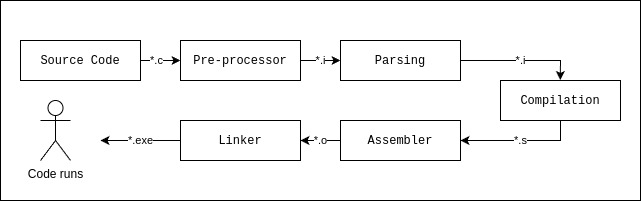
- Source Code: It is the code you write; contains the logic, comments, macros, file-inclusions (Ex:
<stdio.h>), conditional builds, etc… Following is an example. - Pre-processor:
- It is invoked by the compiler(Ex: GCC) you are using to build the code.
- Output of preprocessor file:
- Removes comments “//” or “/** **/”.
- macro expansion and “#”
- Header file inclusion: the entire content of the header is copied, replacing “#”, basically contains function declarations and macros.
- Conditional compilation & diagnostics: “#error” inside conditions, resulting in fatal error.
- Uses “linemarkers” to convey information.
- Parsing: Responsible for eliminating whitespace and erroneous characters, checks if it is adhering to programming language’s grammar. AN AST (Abstract Syntax Tree) is output of this phase, additionally, it performs flow, type and label checks. If an error is found, the linemarkers help in showing the error-line.
- Compilation: High-level code is converted to processor-level mnemonics, i.e., assembly code. Assembly
code is always machine-specific; the compiler takes note of the type of machine it is
being used during installation. If you decide to have an assembly code of a different
machine type, then you set flags accordingly for the compiler to know what to build for. - Assembler: Responsible for eliminating whitespace and erroneous characters, checks if it is adhering to programming language’s grammar. AN AST (Abstract Syntax Tree) is output of this phase, additionally, it performs flow, type and label checks. If an error is found, the linemarkers help in showing the error-line.
- Linker (*.o + libraries): Creates executable or binaries that you can run. Linker links (as name says) all the
individual “*.obj” or “*.o” that were created during build process and made into one
final, self-contained executable.
Object File – Decoded: The code is a logic and some data on which it we operate on. The logic or set of instructions, the fixed or constant data, the variable data present, and other components of the logic have to be stored in a certain format, so, that machine is able to load and allocate different regions of memory properly; the compilation process does it and it is called as “segmentation”. It is part of *.o file. The object file is structured with different sections based on the type of data. Each section is called a “segment. It is called a relocatable object file because it has no idea about the address or location of the segment. It is done by the linker based on the processor, it is being run on.
Different memory-sections of code:
| Memory section | Description |
| .data | Contains initialized data |
| .rdata | Holds read-only data of program |
| .bss | Contains uninitialized data |
| .text | Contains the instructions you wrote |
| user-defined | User defined sections |
| special | Added by compiler, lets say it has special information which machine needs while run |
Consider the following adder example:
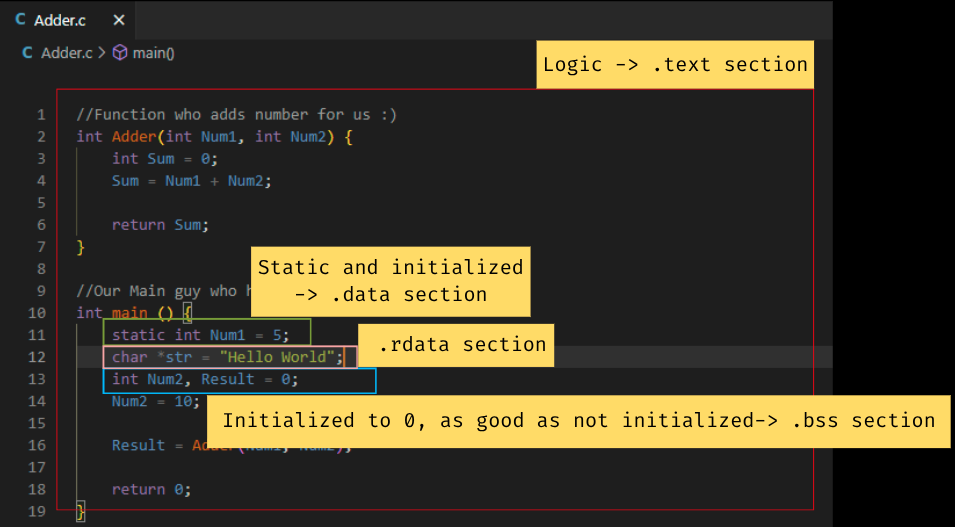
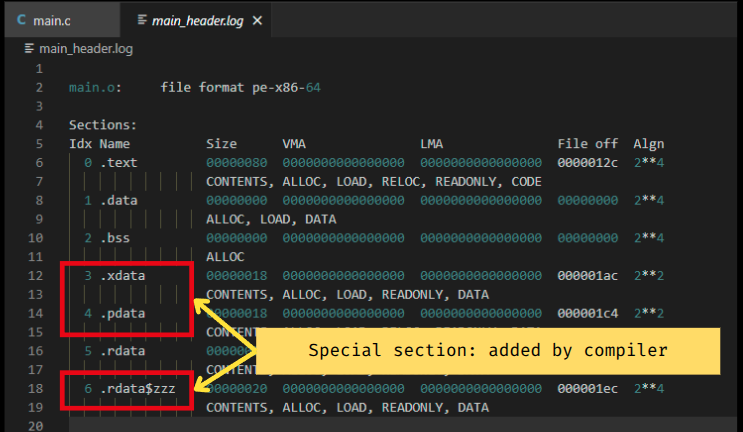
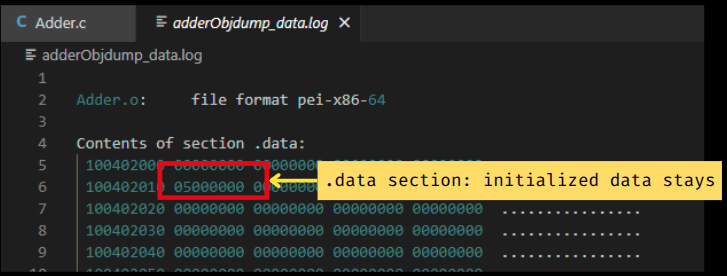
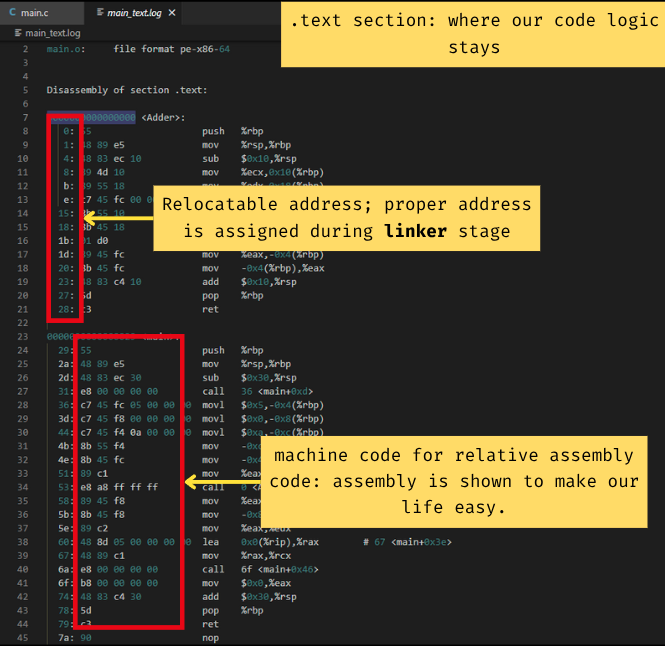
- “.bss” doesn’t consume space in flash, but “.data” does. “.bss” section size is recorded and is allocated in stack, recording of size is done by linker. <- we will learn about it, further.
- “static int Num1 = 5;” will be part of “.data” but “int Num1 = 5;” will be part of “.bss”. WHY? Static will be seen as global data – making “.data” section worthy, for, latter will be taken in “.bss” and considered when main() is called making it “stack” worthy.
Note: A value in “.rdata” cannot be modified, if you try, it will segmentation fault.
Executable (*.exe) – Decoded: After the “*.o” or the assembler stage, “Linker & Locator” come into picture. Linker, it is a script responsible for merging similar sections of different *.o files, thus, resolving undefined symbols, describing how sections in input files should be mapped into output files, and controlling the memory layout of the output file. Linker has its own format and varies between compilers. Locator, uses a linker script to understand how we want to merge different sections and assign addresses accordingly, and what needs to be called and when. Linking stage adds few more sections, which will help during execution.
9. Working of C on Hardware
POV WHEN WE KNOW THE ADDRESS: In the embedded world, interacting directly with hardware is fundamental. This often means accessing and manipulating specific memory locations known as registers. These registers are essentially small storage areas within a micro-controller or peripheral that control its functions or hold its current status. we directly use the known memory address of a register to read data from it or write data to it.
The above can also help us picture how pointers work in complicated systems. Let us consider following LED blink in STM32F4Disc example
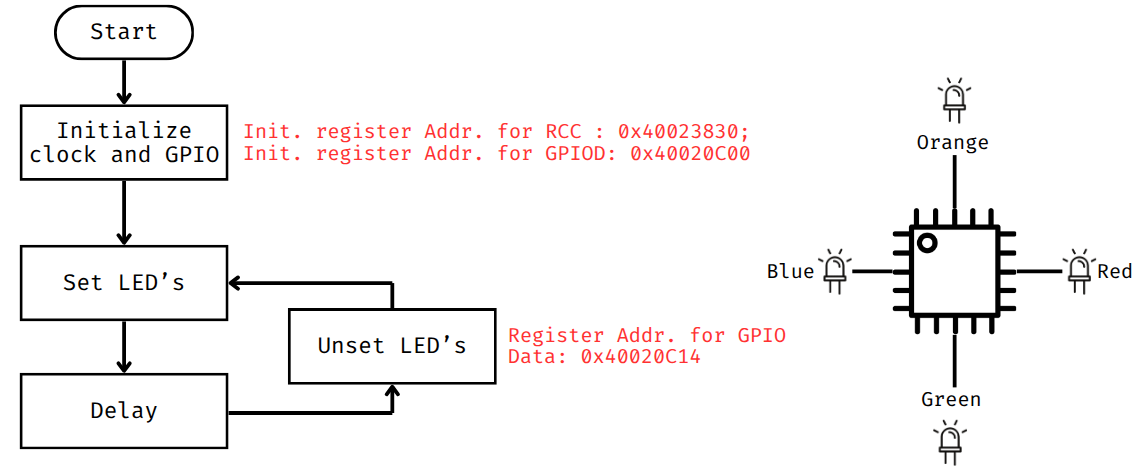
“uint32_t *pRccAhb1enr”    : This declares a pointer variable.
“= (uint32_t *) 0x40023830": (uint32_t *) is a typecast operator. You're telling the compiler that this address
                             points to a location where you want to manipulate a 32-bit unsigned integer value..
“0x40023830"               : is a specific memory address
/**
 * @file LED Blink
 * @brief LED control functions for STM32 microcontroller
 * This file contains functions to control LEDs connected to GPIOD pins 12-15
 * on an STM32 microcontroller using direct register access.
 */

#include <stdint.h>

/**
 * @brief Initializes LED GPIO pins
 * Configures GPIOD pins 12-15 as output pins by:
 * - Enabling clock for GPIOD in RCC_AHB1ENR
 * - Setting pins 12-15 to output mode in GPIOD_MODER
 */
void LedInit (void);

/**
 * @brief Toggles specified LED state
 * @param led LED number (0-3) corresponding to GPIOD pins (12-15)
 * Toggles the state of corresponding GPIOD pin using GPIOD_ODR register
 */
void LedToggle(uint8_t led);

void LedInit (void) {
    uint32_t *pRccAhb1enr = (uint32_t *)0x40023830; // RCC_AHB1ENR address
    uint32_t *pGpiodMode = (uint32_t *)0x40020C00; // GPIOD_MODER address

    // Enable clock for GPIOD
    *pRccAhb1enr |= (1 << 3); // Set bit 3 to enable GPIOD clock

    // Set GPIOD pins 12, 13, 14, and 15 to output mode
    *pGpiodMode &= ~(0xFF << 24); // Clear bits for pins 12-15
    *pGpiodMode |=  (0x55 << 24); // Set bits for output mode (01) for pins 12-15
    // Note: 0x55 corresponds to 01010101 in binary, setting each pin to output mode
    // Pins 12, 13, 14, and 15 are now configured as output
}
void LedToggle (uint8_t led) {
    uint32_t *pGpiodOdr = (uint32_t *)0x40020C14; // GPIOD_ODR address

    // Toggle the specified LED pin
    *pGpiodOdr ^= (1 << (led + 12)); // Toggle bit corresponding to the LED pin
}

int main(void) {
    // Main function to initialize and toggle LEDs
    // Initialize the system clock and peripherals if necessary
    LedInit(); // Initialize LEDs

    while (1) {
        // Main loop
        LedToggle(1); // Toggle LED 1
        LedToggle(2); // Toggle LED 2
        LedToggle(3); // Toggle LED 3
        LedToggle(0); // Toggle LED 0

        // Add a delay to observe the toggling effect
        for (volatile int i = 0; i < 100000; i++); // Simple delay loop
    }
    return 0;
}
POV WHY ALWAYS “main ()”:
CRT is responsible for initialization and OS loader for memory to run your code. So, CRT (C RunTime library) runs before calling “main ()”. It initializes stack, heap, copies memory section(only needed) and other needs, then “main ()”. When the linker combines your compiled code with the CRT, it takes the CRT’s various code and data sections and inserts them into the final executable.
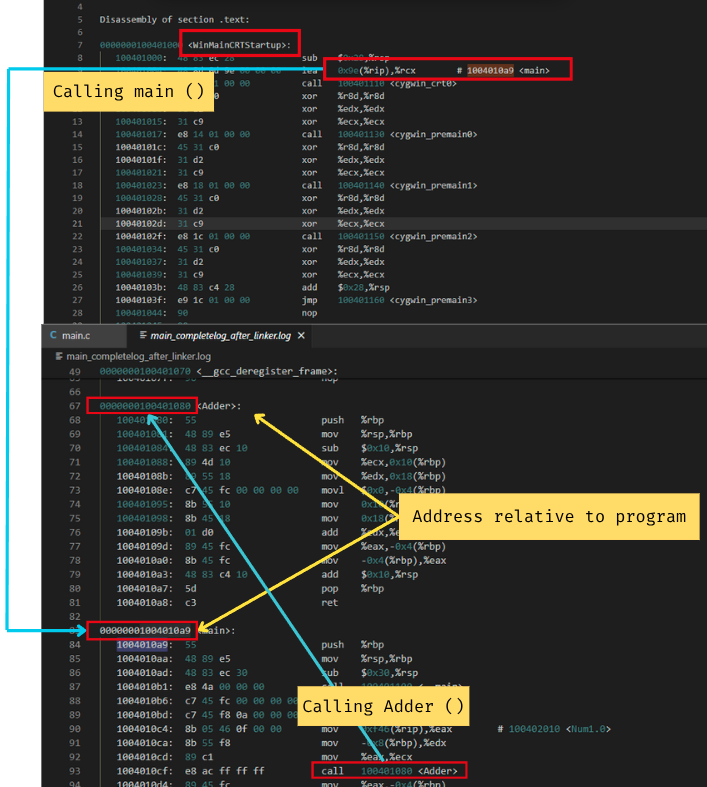
The address is a “virtual address” relative to some base, which will get translated to a real address by the Memory Management Unit (MMU) when the program is executed. The virtual address is decided by the linker, for example, it might decide that main is at an offset of 0x1000 from the beginning of the code segment.
The operating system’s loader is responsible for loading the executable into a specific virtual address within the process’s virtual address space. The compiler and linker are involved in creating the relative layout of your program’s components, but the absolute virtual address at which your program loads and runs is determined by the OS loader.
Reason for CRT to call main ():
- Standardization and Convention: The C and C++ language standards explicitly define
main()as the designated entry point for programs in a “hosted environment” (i.e., programs that run under an operating system). This standardization ensures that any C/C++ compiler and linker will produce an executable that an OS can understand how to start. - When you execute a program, the operating system (OS) needs to know where to begin running your code. It can’t just randomly pick a spot.
While main() is pervasive, there are contexts where a different entry point name or mechanism is used.
Here, we write our strartup code for STM32. Worth exploring. The code is self explanatory. If doubts feel free to connect.
POV Working of code on main-memory:
We will consider following example and understand how the code works on main-memory on a typical system with a CPU, RAM, and a basic operating system.
/**
 * @file Adder.c
 * @brief Demonstrates a simple addition of two integers using a function.
 *
 * This file contains a sample C program that defines an Adder function to add two integers
 * and demonstrates its usage in the main function.
 *
 * Functions:
 *  - int Add(int x, int y): Returns the sum of two integers.
 *  - int main(): Entry point of the program.
 */

#include <stdio.h>

/**
 * @brief This function adds two integers.
 *
 * @param a The first integer
 * @param b The second integer
 * @return The sum of the two integers
 */
int Add(int a, int b) {
    // Adding two integers
    return a + b;
}

/**
 * @brief The main function where the program execution starts.
 *
 * @return The exit status of the program
 */
int main() {
    int x = 10;  // Initializing variable a
    int y = 20; // Initializing variable b
    int result = Add(x, y); // Calculating the sum

    return 0; // Returning 0 to indicate successful completion
}
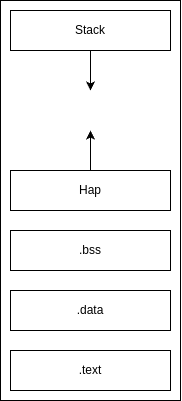
When the program is loaded into RAM by the OS, its virtual address space is divided into several segments.
Stack: Used for local variables, function arguments, return addresses, and saving CPU registers. It grows downwards (from high memory addresses to low memory addresses) on most architectures. And Heap: Used for dynamic memory allocation (e.g., malloc, new). Grows upwards.
| Register | Description |
| Program Counter (PC or IP/EIP/RIP) | Holds the memory address of the next instruction to be executed. |
| Stack Pointer (SP or ESP/RSP) | Points to the top of the stack (the last item pushed) |
| Base Pointer (BP or EBP/RBP) | Often used as a frame pointer, pointing to a fixed location within the current function’s stack frame. |
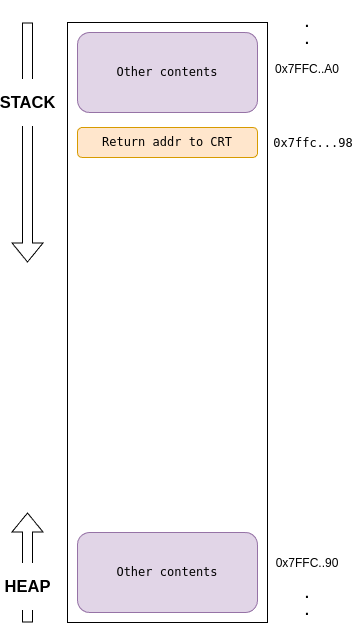
- Step 1: Program Start-up
- OS loader loads your program into virtual memory and C Runtime Library (CRT) startup code runs. The CRT pushes the return address to the CRT onto the stack. This is the memory address where execution should resume after
main()completes.SPis decremented by 8 bytes (size of an address/pointer). - The
main()function’s arguments (if any, likeargc,argv) onto the stack. CRT then callsmain(). - The return address (where the CPU should go after
main()finishes) is pushed onto the stack.
- OS loader loads your program into virtual memory and C Runtime Library (CRT) startup code runs. The CRT pushes the return address to the CRT onto the stack. This is the memory address where execution should resume after
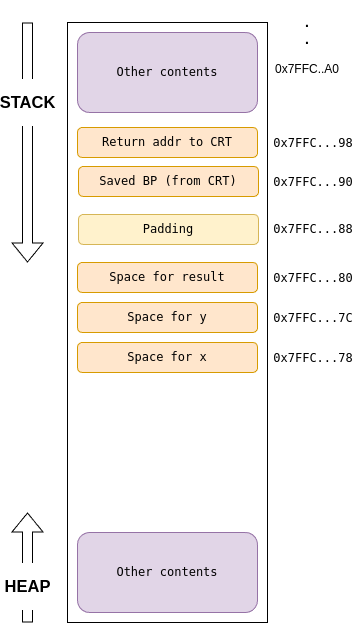
- Step 2: Inside main () – Prologue
- Prologue: this is a step, every time a function gets called, it is compiler-generated code.
push BP: The currentBPis saved on the stack (to restore it later).mov BP, SP: TheBPis now set to the currentSP. ThisBPdefines the base ofmain() stack frame.sub SP, [size_of_local_vars]:SPis decremented to reserve space formain()‘s local variables (x,y,result). 4 bytes = 12 bytes. Plus some padding for 16-byte alignment, a common practice.SPis decremented by 16.
- Prologue: this is a step, every time a function gets called, it is compiler-generated code.
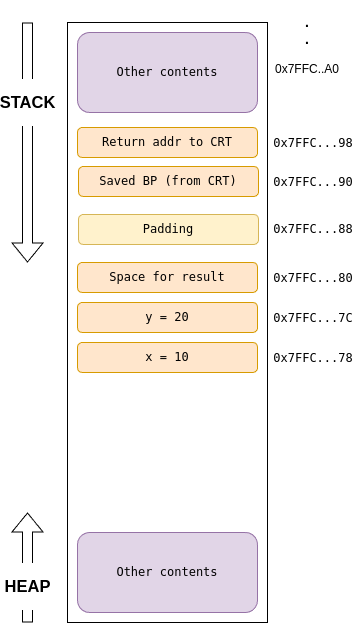
- Step 3: Inside main () – Initializing locals
- Step 4: Inside main () –
main()Callsadd(x, y)- (Arguments on Stack): We are considering stack, but registers are used, only when the arguments cross certain threshold, we start using stack. But note, when using the registers, the values from registers are moved to stack iff register is non-volatile or unless the calling function (the caller) explicitly saves it first. We will focus on stack is used.
- The value of
y(20) is pushed onto the stack.SPdecrements by 4 bytes (size of anint). The value ofx(10) is then pushed onto the stack.SPdecrements by another 4 bytes. This “right-to-left” pushing order ensures that the first argument (x) is at a lower memory address, making it accessible at a fixed positive offset fromBPin the called function. - Call Add () instruction: The
IP(address of the instruction after thecall addinmain()) is pushed onto the stack as the return address for Add().SPdecrements by 8 bytes (size of an address/pointer).IPis updated to point to the first instruction ofAdd().
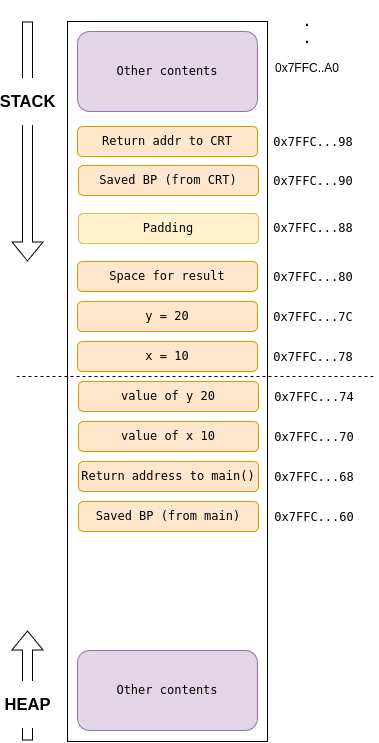
- Step 5: Inside Add () –
push BP: Savesmain‘sBP(0x7FFC...90) onto the stack.SPis decremented by 8 bytes.- mov BP, SP: Sets
BPto the currentSP(e.g.,0x7FFC...60). This establishes the base ofadd‘s stack frame. - Accessing Arguments within
Add ():- (which got
x‘s value) would still be accessed at[BP + 16](relative toadd‘sBP).BPpoints to0x7ffc...60.0x7FFC...60 + 8(size of saved BP) =0x7FFC...68(Return Address).0x7FFC...68 + 8(size of Return Address) =0x7FFC...70(wherex(10) is stored).
- (which got
y‘s value) would still be accessed at[BP + 20](relative toadd‘sBP).0x7FFC...70 + 4(size ofx) =0x7FFC...74(wherey(20) is stored).
- (which got
- return a + b; The CPU fetches the value of
a(10) from0x7FFC...70on the stack. The CPU fetches the value ofb(20) from0x7FFC...74on the stack. It performs the addition:10 + 20 = 30and saves it in register(some standard register)
- Step 6: Inside
Add()– Epilogue and Return–- Epilogue:
mov SP, BP:SPis moved back toadd‘sBP(0x7FFC...60).pop BP: The savedBP(frommain, which is0x7FFC...90) is popped from the stack and restored into theBPregister.SPis incremented by 8 bytes.
retinstruction:- Pops the return address to
main()(0x7FFC...68) from the stack intoIP.SPis incremented by 8 bytes. - Execution jumps back to
main().
- Pops the return address to
- Epilogue:
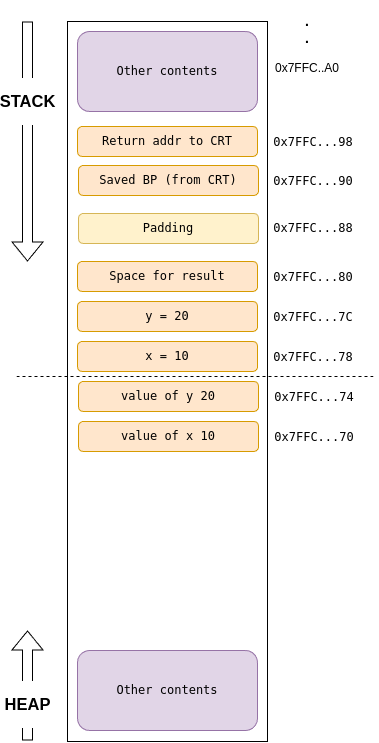
- Step 7: Inside
main()– Cleaning Up Arguments and Storing Result:–- Cleanup:
main(the caller) is responsible for cleaning up the arguments it pushed onto the stack. This is done by adding toSP(e.g.,add SP, 8for the twointarguments). This movesSPback to where it was just before the arguments were pushed. int result = add(x, y);: The value30(fromRAX) is stored intomain()‘s local variableresult(0x7FFC...80).
- Cleanup:
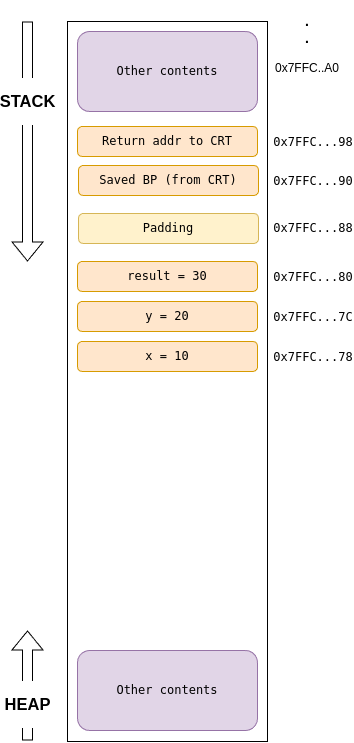
Step 8: The rest of the steps (main() epilogue, program exit) remain the same.
10. Extras, the OG info
- The importance of Pointer:
- Helps develop fast and efficient code, cuz, pointers are closer to the hardware i.e., easier to translate to machine code,
- Dynamic memory allocation.
- Ability to pass data structures without overhead.
- The NULL pointer does not point to any area of memory. Null should not be used in context other than pointers, it might not work sometime or behave absurdly. The NULL is defined as
#define NULL ((void)* 0)- Void pointer: Any pointer can be assigned to a void pointer. The following is how to use void pointer to assign a pointer and dereference.
#include <stdio.h>

int main() {
    int my_integer = 123;
    void* generic_ptr; // Declare a void pointer

    // Assign the address of an integer to the void pointer
    generic_ptr = &my_integer;


    // Step 1: Cast the void pointer to an int pointer
    // Step 2: Dereference the int pointer

    // --- Even more concise (combining cast and dereference) ---
    printf("Value (combined cast and dereference): %d\n", *((int*)generic_ptr));

    return 0;
}- There is no standard way to determine the total amount of memory allocated by the heap. Some compilers provide and extension for this purpose. The max size if system dependent like the amount of physical memory present or the OS constraints.
- Program Stack: It is the area of memory that supports execution of functions and is shared with heap. The program stack holds stack frames, these frames hold the parameters and local variables of a function.
11. References
- “The C Programming Language”-second edition by Brian W. Kernighan & Dennis M. Ritchie.
- Understanding and using C Pointers by Richard M Reese
- Gemini LLM by Google.
 KJ_VIVEK.BLOG :)